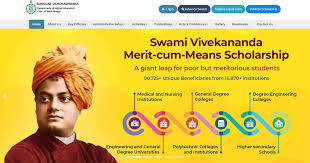
Let’s be real: government scholarship portals can sometimes feel like a maze. You know the support is there, but finding the right door, the right button, and the right information can be a test of patience. If you’re applying for or have already applied for the Swami Vivekananda Merit Cum Means Scholarship (SVMCM) in West Bengal, the official website is your command center. Knowing how to use it confidently can take a huge weight off your shoulders. This isn’t about complex tech skills; it’s about knowing where to click and what to expect.
This guide will walk you through the essential steps—finding the real website, mastering the login process, and demystifying how to check your application status—without any technical jargon or confusion.
The First and Most Important Step: Finding the Official Website
This is critical. Never, ever Google “Swami Vivekananda Scholarship apply” and click on the first ad you see. Unscrupulous agents create look-alike sites to collect data or money.
The only official website is hosted by the Government of West Bengal. It will typically have a URL that reflects this, often structured around the Higher Education Department.
The most reliable method is to go directly to the Department of Higher Education, Government of West Bengal’s main website and look for the scholarship section or announcements. They will provide the direct link to the SVMCM application portal.
Once you’re there, bookmark it. This single step protects you from scams and ensures all your information goes directly to the right authorities.
Creating Your Account and The Login Process
The portal is your personal gateway. Here’s how to get your key.
Registration: Setting Up Your Identity
Look for the “New Student Registration” or “Register Here” button. You will need to provide foundational details to create your unique student account:
- A valid, active mobile number and email address. This is non-negotiable. All communication, including password resets and status alerts, will come here.
- Basic personal information like your name, date of birth, and perhaps your Aadhaar number.
- You will likely set a security question for account recovery.
Keep a dedicated notebook or a digital file to store this login information. Writing down your chosen username and password in a secure place will save you from future headaches.
The Login: Your Portal to Action
After registration, you can log in anytime. The login page is straightforward: enter your username or registered email and your password. Some portals also use your application ID after you’ve submitted.
- Forgot Password? Don’t panic. Use the “Forgot Password” link. You will need your registered email or mobile to receive a One-Time Password (OTP) to reset it. This is why that valid contact info is so vital.
The Heart of the Matter: Checking Your Application Status
You’ve submitted your form. Now, the waiting begins. Checking your status isn’t about refreshing the page daily out of anxiety; it’s about informed, periodic follow-ups.
After logging in, navigate to your student dashboard or look for a tab labeled “Application Status,” “View Status,” or “Track Application.”
Here’s what the different statuses you might see actually mean:
- “Submitted” / “Under Scrutiny”: This is the most common initial status. It means your application has been received and is undergoing the first level of verification, usually at your institution (college/university). No action is needed from you unless you are contacted for a correction.
- “Forwarded to District Committee” / “Under District Verification”: A positive step. Your college has verified and forwarded it to the district-level authorities for the next round of checks, particularly for income and domicile certificates.
- “Approved”: The golden word. This means your application has passed all verification levels at the district and state level and you have been selected for the scholarship. You will later see “Payment Initiated” or “Sanctioned” as the disbursement process begins.
- “Rejected” / “Invalid”: If you see this, there is usually a reason stated, such as “Income Certificate Invalid,” “Marks Criteria Not Fulfilled,” or “Documents Unclear.” Do not give up immediately. The portal may allow a short window for a re-submission or correction. Note the reason, gather the correct document or information, and contact your institute’s scholarship coordinator for guidance on the appeal process.
- “Pending at Institute” / “Correction Required”: Your college has flagged an issue. You must contact your college’s scholarship cell or nodal officer immediately to understand the exact problem and resolve it so they can re-forward your application.
A Crucial Reminder: The final, authoritative Merit List of selected scholars is always published separately as a PDF or list on the official website. Even if your portal says “Approved,” always cross-check your name and application ID against the official published list when it is announced. The status portal is for individual tracking; the merit list is the final confirmation.
Pro Tips for a Smooth Digital Experience
- Use a Laptop or Desktop: Fill out the application form on a computer, not a phone. The screen size makes it easier to review details and upload documents correctly.
- Browser Matters: Use updated browsers like Chrome or Firefox. Clear your cache if the portal seems slow or glitchy.
- Screenshots are Your Friend: After successfully submitting or when you see an important status, take a screenshot for your records. Note down your application ID number.
- Patience is Data Entry: The portal can be slow during peak application times. Avoid last-minute rushes. Save your progress frequently if the form allows it.
Navigating the Swami Vivekananda Scholarship portal is a lesson in careful, patient attention to detail. It’s the digital handshake between you and the scholarship board. By knowing the official website, securing your login, and understanding the language of application statuses, you move from being a passive applicant to an informed candidate, calmly in control of your own process. Now, take a deep breath, and go log in.
Your Digital Paper Trail: More Than Just Buttons and Clicks
Logging into the Swami Vivekananda Scholarship portal and hitting refresh on your status page might feel like a small, routine act. But step back for a moment. What you’re actually doing is far more significant. You’re not just checking a status; you’re following the official, tangible proof of your effort. Each login, each page load, is a quiet checkpoint in a journey you set in motion the day you decided your education was worth fighting for.
This portal isn’t just a website. It’s the bridge between your hard work and the support designed to meet it. Seeing “Submitted” means your voice has been heard by the system. Seeing “Approved” is that system saying “yes” in return. Even a status like “Correction Required” isn’t a closed door—it’s a specific instruction, a chance to strengthen your case with better evidence. Every update, good or challenging, is information you can work with.
Swami Vivekananda Scholarship: Your Top Portal & Login Questions Answered
What is the official website for the Swami Vivekananda Scholarship?
The only official portal is run by the Government of West Bengal’s Higher Education Department. Be extremely careful of look-alike sites. The safest way is to search for “Higher Education Department West Bengal” and navigate to the scholarship section from their main government site, or look for a direct link in the latest official SVMCM notification. Always check that the web address (URL) ends in .gov.in.
I forgot my password. How do I reset it?
Don’t worry, this is common. On the login page, click the “Forgot Password” link. You will need to enter your registered email address or mobile number. The system will send a One-Time Password (OTP) to that contact. Enter the OTP on the portal, and you will be allowed to create a new, secure password. This is why providing active contact details during registration is so important.
Can I change my registered mobile number or email?
This can be difficult once your application is submitted. The contact information is your primary ID for login and all communications. If you absolutely must change it, you should contact the helpdesk or support email provided on the portal immediately, explaining your situation. You may also need to visit your college’s scholarship cell for assistance. It’s much harder than resetting a password, so double-check these details during registration.
How do I check my application status?
- Log in to the official portal.
- Look for a section like “Application Status,” “Track Application,” or “View Status.” This is often on your student dashboard or in a main menu.
- Your status will be displayed there (e.g., Submitted, Under Scrutiny, Approved).
What does “Under Scrutiny” status mean?
This is a standard status and means your application is being verified. It is usually at the college/institute level or the district level. Officials are checking your documents against the eligibility criteria. No action is needed from you unless you are contacted for a correction. Be patient, as this stage can take several weeks.
My status says “Rejected.” What should I do?
First, don’t panic. The portal often shows a specific reason, such as “Income Certificate Invalid” or “Marks Not Met.” Note this reason down carefully.
- Contact your college scholarship coordinator first. They can often provide clarity and guide you on the appeal or correction process.
- There may be a short window to re-submit corrected documents or appeal the decision. Act quickly using the official channels advised by your institute.
I see “Approved” on the portal. When will I receive the payment?
“Approved” means you have been selected for the scholarship. Congratulations! However, the payment is processed separately by the state government and disbursed in installments directly to your registered bank account. There is no fixed date. You must keep checking the portal for updates like “Payment Initiated” or “Sanctioned” and monitor your bank account. It can take a few months after approval.
The website is not loading/is very slow. What can I do?
This is common, especially near deadlines or when merit lists are published.
- Try during non-peak hours (early morning or late evening).
- Use a desktop or laptop with a stable internet connection.
- Try a different web browser (like Chrome, Firefox).
- Clear your browser’s cache and cookies.
If the main site is down, wait a few hours and try again. Avoid using third-party links.
How can I download my application form or receipt?
After you successfully submit, there is usually an option to “Print Application” or “Download PDF” on the final screen or in your dashboard. Download and save this immediately, along with the payment receipt (if any). If you missed it, log in and check for a “View Submitted Application” section.
Who do I contact if I have a technical problem with the portal?
Use the official contact information listed on the scholarship portal itself, such as a helpdesk email or phone number. Your second line of support is always the scholarship nodal officer at your own college or university. They are the liaison between students and the state authorities.